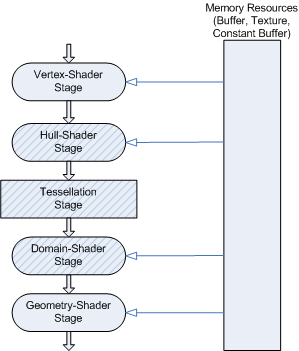
Figure 6.1: Tessellation pipeline Source: Microsoft
In this chapter, we will explain the function called "Tessellation" that divides polygons on the GPU and how to displace the divided vertices by Displacement map.
The sample in this chapter is "Tessellation" from
https://github.com/IndieVisualLab/UnityGraphicsProgramming4
.
Tessellation is a function that divides polygons on the GPU, which is installed as standard in rendering pipelines such as DirectX, OpenGL, and Metal.
Normally, vertices, normals, tangents, UV information, etc. are transferred from the CPU to the GPU and flow to the rendering pipeline, but when processing high polygons, the transfer band between the CPU and GPU is overloaded, and the drawing speed bottle It will be a neck.
Since Tessellation provides the function to divide the mesh on the GPU, it is possible to process polygons that have been reduced to some extent on the CPU, subdivide them on the GPU, and restore them to fine displacement by Displacement map lookup. Will be.
In this book, I will mainly explain the Tessellation function in Unity.
Tessellation adds three stages to the drawing pipeline: "Hull Shader", "Tessellation", and "Domain Shader". Three stages will be added, but there are only two programmable stages, "Hull Shader" and "Domain Shader".
Figure 6.1: Tessellation pipeline Source: Microsoft
[*1] https://docs.microsoft.com/en-us/windows/desktop/direct3d11/direct3d-11-advanced-stages-tessellation
Understanding the details of each stage here and implementing Hull Shader and Domain Shader is one way to deepen your understanding of Tessellation, but in Unity, Wrapper, which is very convenient, is Surface Shader. It is available in a form that can be incorporated into.
First, let's perform Tessellation and Displacement based on this Surface Shader.
I will explain about Tessellation supported by Surface Shader with comments in the comments.
TessellationSurface.Shader
Shader "Custom/TessellationDisplacement"
{
    Properties
    {
        _EdgeLength ("Edge length", Range(2,50)) = 15
        _MainTex ("Base (RGB)", 2D) = "white" {}
        _DispTex ("Disp Texture", 2D) = "black" {}
        _NormalMap ("Normalmap", 2D) = "bump" {}
        _Displacement ("Displacement", Range(0, 1.0)) = 0.3
        _Color ("Color", color) = (1,1,1,0)
        _SpecColor ("Spec color", color) = (0.5,0.5,0.5,0.5)
        _Specular ("Specular", Range(0, 1) ) = 0
        _Gloss ("Gloss", Range(0, 1) ) = 0
    }
    SubShader
    {
        Tags { "RenderType"="Opaque" }
        LOD 300

        CGPROGRAM

        // tessellate: Specify a function that defines the number of patch divisions and method as tessEdge
        // As vertex: disp, specify disp for the function that performs displacement.
        // Called inside the Domain Shader inside the Wrapper
        #pragma surface surf BlinnPhong addshadow fullforwardshadows
            vertex:disp tessellate:tessEdge nolightmap
        #pragma target 4.6
        #include "Tessellation.cginc"

        struct appdata
        {
            float4 vertex : POSITION;
            float4 tangent : TANGENT;
            float3 normal: NORMAL;
            float2 texcoord : TEXCOORD0;
        };

        sampler2D _DispTex;
        float _Displacement;
        float _EdgeLength;
        float _Specular;
        float _Gloss;

        // A function that specifies the number of divisions and the division method
        // This function is called per patch, not per vertex
        // Specify the number of edge divisions of the patch consisting of 3 vertices in xyz,
        // Specify the number of divisions inside the patch in w and return it
        float4 tessEdge (appdata v0, appdata v1, appdata v2)
        {
            //Tessellation.cginc has a function that defines three types of splitting methods

            // Tessellation according to the distance from the camera
            //UnityDistanceBasedTess

            // Tessellation according to the edge length of the mesh
            //UnityEdgeLengthBasedTess

            // Culling function in UnityEdgeLengthBasedTess function
            //UnityEdgeLengthBasedTessCull

            return UnityEdgeLengthBasedTessCull(
                v0.vertex, v1.vertex, v2.vertex,
                _EdgeLength, _Displacement * 1.5f
            );
        }

        // This is the disp function specified in the Displacement processing function.
        // This function is in Wrapper after Tessellator
        // Called in the Domain Shader.
        // All the elements defined in appdata in this function are accessible, so
        // Displacement and other processing such as vertex modulation are performed here.
        void disp (inout appdata v)
        {
            // Here, we are performing vertex modulation in the normal direction using the Displacement map.
            float d = tex2Dlod(
                _DispTex,
                float4(v.texcoord.xy,0,0)
            ).r * _Displacement;
            v.vertex.xyz += v.normal * d;
        }

        struct Input
        {
            float2 uv_MainTex;
        };

        sampler2D _MainTex;
        sampler2D _NormalMap;
        fixed4 _Color;

        void surf (Input IN, inout SurfaceOutput o)
        {
            half4 c = tex2D (_MainTex, IN.uv_MainTex) * _Color;
            o.Albedo = c.rgb;
            o.Specular = _Specular;
            o.Gloss = _Gloss;
            o.Normal = UnpackNormal(tex2D(_NormalMap, IN.uv_MainTex));
        }
        ENDCG
    }
    FallBack "Diffuse"
}
Displacement processing using Surface Shader is realized with the above Shader. You can get great benefits with a very cheap implementation.
Implementation when writing each Tessellation stage in Vertex / Fragment Shader.
The Hull Shader is a programmable stage, called immediately after the Vertex Shader. Here, we mainly define "division method" and "how many divisions".
The Hull Shader consists of two functions, a "control point function" and a "patch constant function", which are processed in parallel by the GPU. The control point is the control point of the division source, and the patch has the topology to divide. For example, if you want to form a patch for each triangular polygon and divide it with a Tessellator, there are 3 control points and 1 patch.
The control point function works per control point, and the patch constant function works per patch.
Tessellation.Shader
#pragma hull hull_shader

// Structure used as input of hull shader system
struct InternalTessInterp_appdata
{
    float4 vertex : INTERNALTESSPOS;
    float4 tangent : TANGENT;
    float3 normal: NORMAL;
    float2 texcoord : TEXCOORD0;
};

// Tessellation coefficient structure defined and returned by the patch constant function
struct TessellationFactors
{
    float edge[3] : SV_TessFactor;
    float inside : SV_InsideTessFactor;
};

// hull constant shader (patch constant function)
TessellationFactors hull_const (InputPatch<InternalTessInterp_appdata, 3> v)
{
    TessellationFactors o;
    float4 tf;

    // Split Utility function explained in the comment at the time of Tessellation on Surface shader
    tf = UnityEdgeLengthBasedTessCull(
        v[0].vertex, v[1].vertex, v[2].vertex,
        _EdgeLength, _Displacement * 1.5f
    );

    // Set the number of edge divisions
    o.edge [0] = tf.x;
    o.edge[1] = tf.y;
    o.edge [2] = tf.z;
    // Set the number of divisions in the center
    o.inside = tf.w;
    return o;
}

// hull shader (control point function)

// Triangular polygon with split primitive type tri
[UNITY_domain("tri")]
// Select the division ratio from integer, fractional_odd, fractional_even
[UNITY_partitioning("fractional_odd")]
// Topology after division triangle_cw is a clockwise triangle polygon Counterclockwise is triangle_ccw
[UNITY_outputtopology("triangle_cw")]
// Specify the patch constant function name
[UNITY_patchconstantfunc("hull_const")]
// Output control point. 3 outputs for triangular polygons
[UNITY_outputcontrolpoints(3)]
InternalTessInterp_appdata hull_shader (
    InputPatch<InternalTessInterp_appdata,3> v,
    uint id : SV_OutputControlPointID
)
{
    return v[id];
}
Here, the patch is divided according to the tessellation factor (Tessellation Factors structure) returned by the Hull shader.
The Tessellation Stage is not programmable, so you cannot write a function.
Domain Shader is a programmable stage that reflects positions such as vertices, normals, tangents, and UVs based on the processing results of the Tessellation Stage.
A semantic parameter called SV_DomainLocation is input to the Domain Shader, so this parameter will be used to reflect the coordinates.
Also, if you want to perform displacement processing, describe it in Domain Shader. After Domain Shader, the process flows to Fragment Shader and the final drawing process is performed, but if the Geometry Shader function is specified in #pragma, it can also be sent to Geometry Shader.
Tessellation.Shader
#pragma domain domain_shader

struct v2f
{
    UNITY_POSITION(pos);
    float2 uv_MainTex : TEXCOORD0;
    float4 tSpace0 : TEXCOORD1;
    float4 tSpace1 : TEXCOORD2;
    float4 tSpace2 : TEXCOORD3;
};

sampler2D _MainTex;
float4 _MainTex_ST;
sampler2D _DispTex;
float _Displacement

v2f vert_process (appdata v)
{
    v2f o;
    UNITY_INITIALIZE_OUTPUT(v2f,o);
    o.pos = UnityObjectToClipPos(v.vertex);
    o.uv_MainTex.xy = TRANSFORM_TEX(v.texcoord, _MainTex);
    float3 worldPos = mul(unity_ObjectToWorld, v.vertex).xyz;
    float3 worldNormal = UnityObjectToWorldNormal(v.normal);
    fixed3 worldTangent = UnityObjectToWorldDir(v.tangent.xyz);
    fixed tangentSign = v.tangent.w * unity_WorldTransformParams.w;
    fixed3 worldBinormal = cross(worldNormal, worldTangent) * tangentSign;
    o.tSpace0 = float4 (
        worldTangent.x, worldBinormal.x, worldNormal.x, worldPos.x
    );
    o.tSpace1 = float4 (
        worldTangent.y, worldBinormal.y, worldNormal.y, worldPos.y
    );
    o.tSpace2 = float4 (
        worldTangent.z, worldBinormal.z, worldNormal.z, worldPos.z
    );
    return o;
}

void disp (inout appdata v)
{
    float d = tex2Dlod(_DispTex, float4(v.texcoord.xy,0,0)).r * _Displacement;
    v.vertex.xyz -= v.normal * d;
}

// Domain shader function
[UNITY_domain("tri")]
v2f domain_shader (
    TessellationFactors tessFactors,
    const OutputPatch<InternalTessInterp_appdata, 3> vi,
    float3 bars: SV_DomainLocation
)
{
    appdata v;
    UNITY_INITIALIZE_OUTPUT(appdata,v);
    // Set each coordinate based on the SV_DomainLocation semantics calculated in the Tessellation stage.
    v.vertex   =
        vi [0] .vertex * bary.x +
        vi [1] .vertex * bary.y +
        vi [2] .vertex * Bary.z;
    v.tangent  =
        vi [0] .tangent * bary.x +
        vi [1] .tangent * bary.y +
        vi [2] .tangent * Bary.z;
    v.normal =
        vi [0] .normal * bary.x +
        vi [1] .normal * Bary.y +
        vi [2] .normal * Bary.z;
    v.texcoord =
        vi [0] .texcoord * bary.x +
        vi [1] .texcoord * bary.y +
        vi [2] .texcoord * Bary.z;

    // This is the best place to do Displacement processing.
    disp (v);

    // Finally, describe the process just before passing to the fragment shader.
    v2f o = vert_process (v);
    return o;
}
The above is the process when incorporating Tessellation into Vertex / Fragment Shader.
Finally, I will attach an example. In this example, the fluid RenderTexture output of the grid method described in "Unity Graphics Programming vol.1" is used as the Height map, and the Plane mesh originally included in Unity is subjected to Tessellation and Displacement processing.
Originally it is a Plane mesh with a limited number of vertices, but you can see that the mesh follows with a high particle size without breaking.
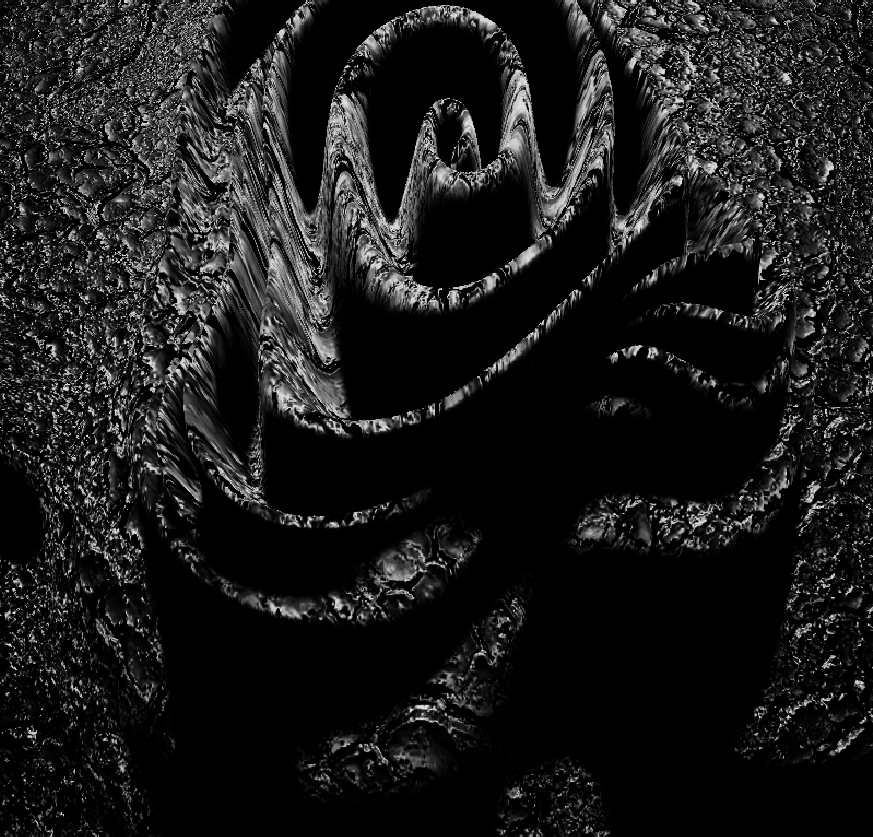
Figure 6.2: Fluid Displacement
In this chapter, we introduced "Tessellation".
Tessellation is a technology that has withered to some extent, but I think that it is easy to use from performance optimization to creative use, so I hope you will use it where you need it.